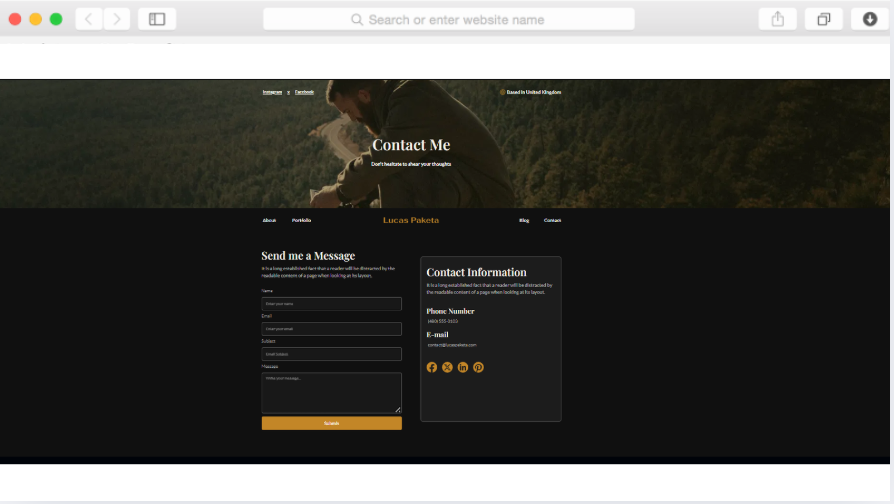
Lucas - Modèle de site web pour portfolio de directeur de la photographie
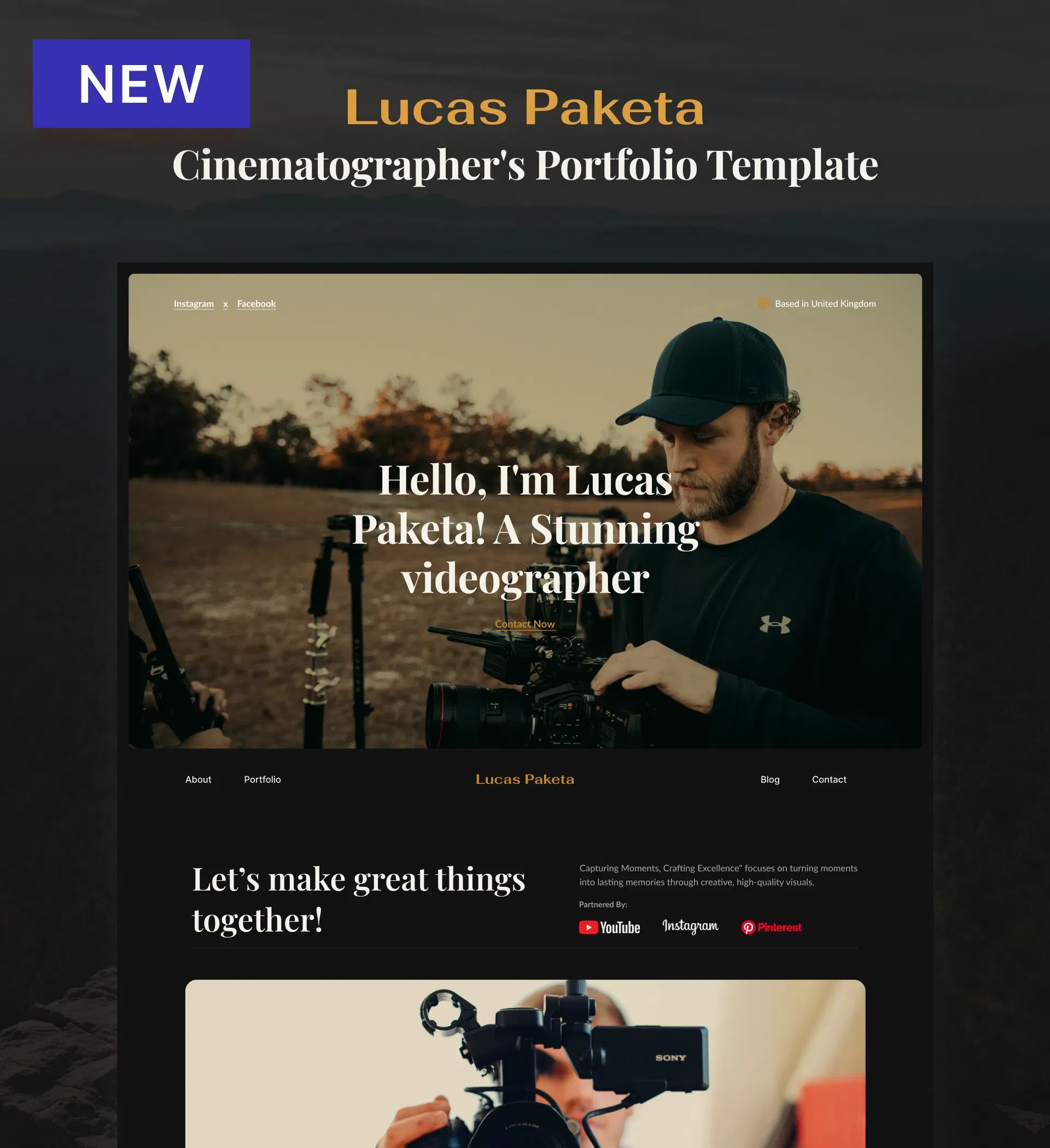
Modèle de portfolio professionnel destiné aux cinéastes, comprenant des galeries vidéo, des statistiques sur les clients, des rubriques sur les services proposés et des fonctionnalités de blog pour mettre en valeur votre travail et attirer efficacement des clients.
Pour créer un portfolio qui rende compte de toute la puissance dramatique et de la maîtrise artistique de la cinématographie, il ne suffit pas de se contenter de modèles standard. Lucas allie une esthétique sombre et cinématographique à des fonctionnalités pratiques qui aident les vidéastes et les cinéastes à présenter leur travail avec l'impact qu'il mérite.
Ce modèle part du principe que votre portfolio ne doit pas seulement être esthétique : il doit aussi transformer les visiteurs en clients. Avec des sections dédiées à la présentation de vos projets, à la mise en avant de vos services, à l'affichage des logos de vos clients et au partage d'informations sur votre secteur d'activité via des articles de blog, chaque élément contribue à la croissance de votre entreprise.
Que vous soyez cinéaste indépendant, membre d'une société de production ou vidéaste freelance en train de vous forger une réputation, Lucas vous offre les outils professionnels indispensables pour présenter votre bande démo, vos références et vos coordonnées de manière à inspirer confiance et à susciter des demandes.
Caractéristiques principales
Présentez votre travail à travers des galeries axées sur la vidéo
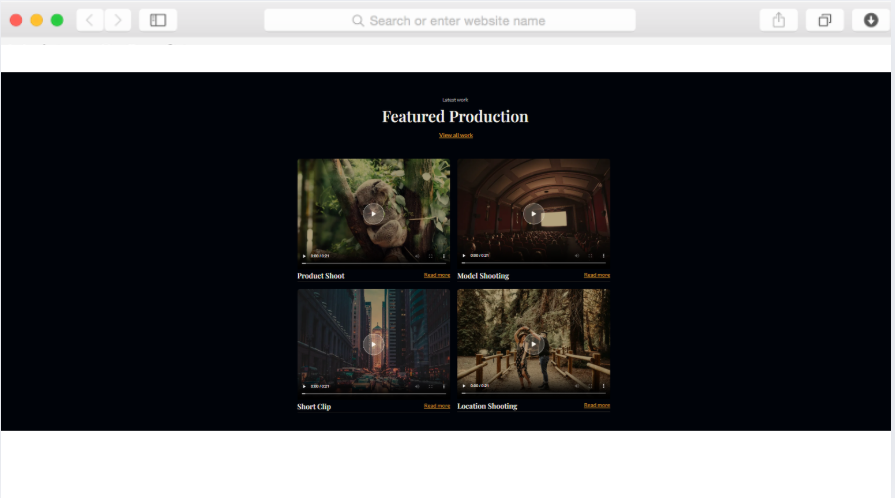
Votre travail cinématographique mérite une présentation à la hauteur de la qualité de votre production. La section « Portfolio » utilise des mises en page en grille et des éléments vidéo pour mettre vos projets en valeur, permettant ainsi aux clients potentiels de se faire immédiatement une idée de votre style et de vos compétences.
Grâce à de nombreuses options de galeries, vous pouvez classer vos travaux par type de projet, par client ou par style. Les arrière-plans vidéo apportent du mouvement et de la dynamique aux sections clés, créant ainsi une expérience de navigation immersive qui incite les visiteurs à rester plus longtemps sur votre contenu.
Renforcez votre crédibilité grâce aux statistiques et à la preuve sociale
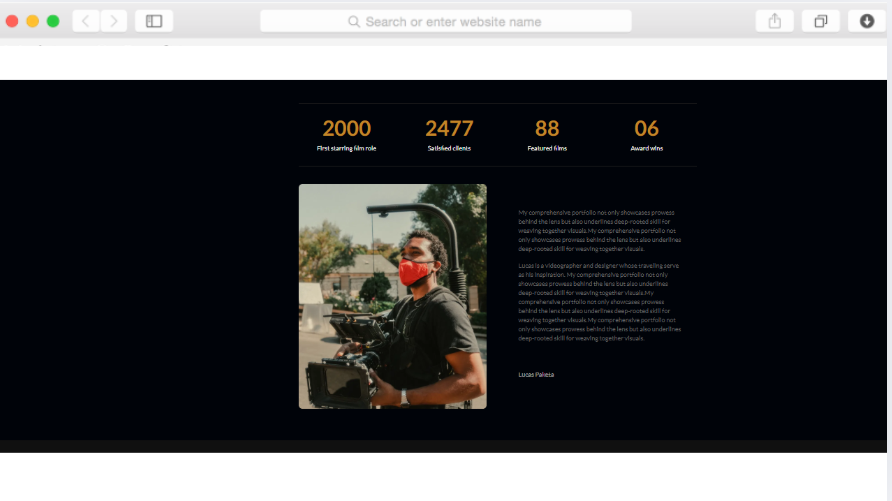
La section « Statistiques », agrémentée d'animations de compteurs, vous permet de mettre en avant des réalisations concrètes : projets menés à bien, clients satisfaits, années d'expérience ou récompenses obtenues. Les chiffres inspirent davantage confiance que les descriptions seules.
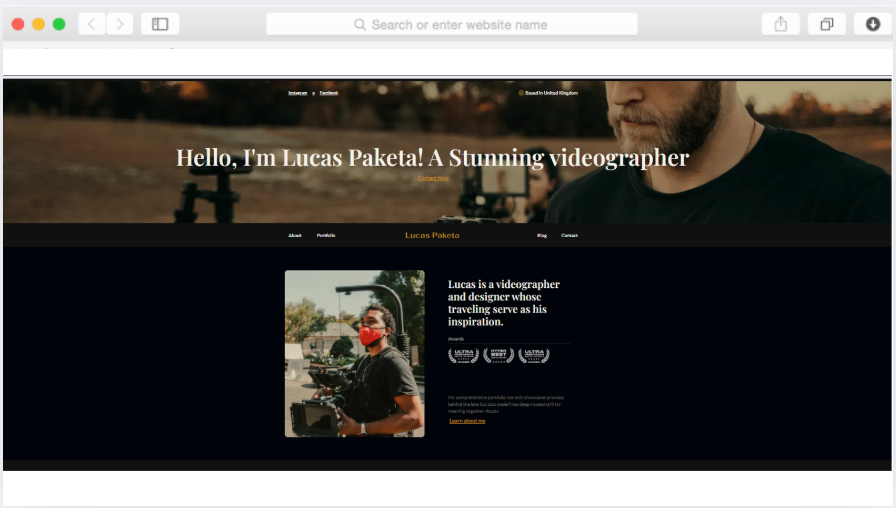
Les badges de récompenses et les bannières arborant le logo de vos clients constituent une preuve visuelle immédiate de votre professionnalisme. Lorsque les visiteurs voient des marques reconnues ou des distinctions professionnelles, ils comprennent d'emblée que vous offrez des résultats qui méritent qu'on y investisse.
Stimulez les demandes grâce à des outils de prospection stratégiques
Les formulaires de contact permettent de recueillir des prospects sans perturber l'expérience de navigation. Placez-les stratégiquement après les exemples de votre portfolio ou les descriptions de vos services, au moment où l'intérêt est à son comble et où les visiteurs sont prêts à passer à l'action.
L'intégration des réseaux sociaux vous permet d'étendre votre audience au-delà de votre site web. Les icônes de réseaux sociaux et les flux d'actualités permettent aux visiteurs de vous suivre sur leurs plateformes préférées, ce qui contribue à créer une communauté autour de votre travail et à maintenir l'intérêt de votre public entre deux projets.
Partager les connaissances du secteur grâce à un blog intégré
La section d'aperçu du blog intégrée vous permet de mettre en avant votre expertise au-delà de la caméra. Écrivez sur les techniques de cinématographie, les avis sur le matériel, les études de cas ou les tendances du secteur pour démontrer vos connaissances et améliorer votre visibilité dans les résultats de recherche.
La publication régulière de contenu aide les clients potentiels à vous trouver via les moteurs de recherche tout en vous positionnant comme un leader d'opinion. Les articles de blog donnent aux prospects de nombreuses raisons de revenir sur votre site, ce qui permet de créer une relation de confiance qui se traduira à terme par des réservations.
Composants réutilisables
Concevez une fois, déployez partout. Créez des composants réutilisables pour les éléments que vous utilisez sur plusieurs pages : descriptions de services, modèles de témoignages ou sections d'appel à l'action. Lorsque vous mettez à jour un composant, comme vos coordonnées ou la liste de vos services, les modifications s'affichent automatiquement partout où ce composant est présent.
Cette méthode vous fait gagner un temps précieux lorsque vous devez mettre à jour vos tarifs, ajouter de nouveaux services ou actualiser vos coordonnées. Au lieu de parcourir chaque page, il vous suffit d'effectuer une seule modification pour que les changements s'appliquent automatiquement à l'ensemble de votre site.
Personnalisations
Plus rien ne vous sépare de votre portfolio idéal. L'éditeur « glisser-déposer » de Dorik vous permet de modifier les couleurs, les polices, l'espacement et la mise en page grâce à des commandes visuelles intuitives qui s'utilisent naturellement, sans aspect technique.
Passez d'un style sombre à un style clair et aéré, remplacez les touches dorées par les couleurs de votre marque, adaptez la typographie à votre style, le tout sans toucher au CSS. Le modèle s'adapte à vos modifications en temps réel, ce qui vous permet de voir exactement ce que les visiteurs verront avant toute publication.
Pour les vidéastes à l'aise avec le code, les options CSS personnalisées offrent une flexibilité illimitée. Ajoutez des animations sophistiquées, créez des effets de survol uniques ou mettez en place des mises en page spécialisées qui permettront à votre portfolio de se démarquer de celui de tous les autres vidéastes de votre secteur.
Caractéristiques spéciales
Au-delà de la structure des modèles, vous bénéficiez de tous les avantages de la plateforme Dorik, qui vous évitent les casse-tête techniques. La génération de contenu par IA vous aide à rédiger des descriptions de projet et des textes de présentation convaincants lorsque les mots ne viennent pas aussi facilement que les visuels.
Grâce à notre réseau CDN mondial, votre site riche en vidéos se charge rapidement partout dans le monde, ce qui permet de maintenir l'intérêt de vos clients internationaux sans qu'ils ne soient frustrés par les temps de chargement. Avec une bande passante illimitée, vous n'avez plus à craindre que les pics de trafic générés par des projets viraux ou des mises en avant ne saturent votre site.
Le CMS intégré facilite la mise à jour du contenu : vous pouvez ajouter de nouveaux projets, publier des articles de blog ou mettre à jour vos services sans avoir besoin de l'aide d'un développeur. Les certificats SSL assurent une sécurité automatique, protégeant à la fois votre contenu et les données de vos visiteurs sans aucune configuration fastidieuse.
Cas d'utilisation
Des cinéastes indépendants se constituent une clientèle
Les cinéastes indépendants ont besoin d'un portfolio à la hauteur de leur engagement. Ce modèle apporte la touche professionnelle qui permet aux cinéastes débutants de rivaliser avec des noms établis, en mettant en valeur leurs réalisations d'une manière qui privilégie la qualité à la quantité.
La rubrique « Statistiques » transforme une expérience encore limitée en chiffres convaincants : mettez en avant le nombre d'heures de vidéo montées, les types de projets menés à bien ou les taux de satisfaction des clients. Les articles de blog permettent de démontrer votre expertise avant même que votre portfolio ne compte des clients de renom.
Les directeurs de la photographie des sociétés de production se forgent une image de marque personnelle
Travailler pour des sociétés de production permet d'acquérir des compétences, mais ne garantit pas toujours une reconnaissance personnelle. Ce modèle aide les directeurs de la photographie à développer leur image de marque personnelle parallèlement à leur travail au sein de l'entreprise, ce qui leur ouvre la voie à de nouvelles opportunités.
Distinguez vos projets personnels de vos missions professionnelles en organisant votre galerie. Le blog vous permet de partager des points de vue qui différencient votre approche de celle de vos collègues, et ainsi de vous constituer un public qui vous suit spécifiquement, et pas seulement votre employeur.
Les vidéastes qui se tournent vers les projets cinématographiques
Passer des vidéos d'entreprise à la cinématographie narrative implique de présenter votre travail sous un autre angle. L'esthétique cinématographique de ce modèle montre à vos clients potentiels que vous travaillez à un niveau créatif supérieur à celui de la vidéographie classique.
Les rubriques « Services » vous permettent de présenter clairement vos nouvelles offres, tandis que la section « Portfolio » met en avant des projets qui témoignent de votre talent pour la narration cinématographique. Les badges de récompenses renforcent votre crédibilité dans cette phase de transition, en montrant que vous êtes reconnu pour votre mérite artistique, et pas seulement pour vos compétences techniques.
Pourquoi choisir le modèle de site web « Lucas » pour portfolio de directeur de la photographie ?
Comprend des fonctionnalités permettant d'intégrer des éléments vidéo et des arrière-plans vidéo, contrairement aux créateurs de portfolio basiques qui ne prennent en charge que les images statiques et nécessitent un hébergement vidéo tiers
Des animations de compteur et des badges de récompense intégrés, qui évitent d'avoir à recourir à du code personnalisé ou à des plugins d'animation pour mettre en valeur les succès de manière captivante
Les collections CMS vous permettent d'organiser vos projets par type, client ou style, et offrent des options de filtrage que d'autres modèles destinés aux directeurs de la photographie ne proposent pas sans développement sur mesure
Un aperçu du blog et une plateforme de blogging complète sont inclus par défaut, ce qui vous aide à vous positionner dans les résultats de recherche liés à votre secteur d'activité sans avoir à payer pour des systèmes de gestion de contenu distincts
L'intégration des flux des réseaux sociaux permet d'actualiser automatiquement le contenu, contrairement aux portfolios statiques qui nécessitent des mises à jour manuelles pour afficher les activités récentes
Grâce à la bande passante illimitée offerte par Dorik, vous n'aurez pas à payer de frais supplémentaires lorsque des fonctionnalités de projet ou des contenus viraux génèrent des pics de trafic vers votre portfolio riche en vidéos
La génération de contenu par IA permet de rédiger rapidement des descriptions de projet convaincantes, résolvant ainsi le problème courant auquel sont confrontés les directeurs de la photographie lorsque les mots ont autant d'importance que les images
Foire aux questions
Puis-je intégrer des vidéos provenant de YouTube ou de Vimeo au lieu de les télécharger directement ?
Oui, l'élément vidéo prend en charge l'intégration de vidéos provenant des principales plateformes telles que YouTube, Vimeo et d'autres. Cette approche permet d'économiser de la bande passante tout en tirant parti des lecteurs optimisés et de l'infrastructure d'hébergement de ces plateformes pour garantir une lecture fluide sur tous les appareils.
Comment puis-je présenter à la fois mes vidéos et mes photos ?
Utilisez la galerie d'images en complément des galeries vidéo pour présenter la diversité de votre travail. La mise en page en grille s'adapte parfaitement à ces deux types de médias, vous permettant de les organiser par projet ou par type de média, selon la manière dont vous souhaitez que vos clients explorent votre portfolio.
Les visiteurs peuvent-ils filtrer les éléments du portfolio par type de projet ou par client ?
La fonctionnalité « Collections » de CMS vous permet d'organiser les éléments de votre portfolio à l'aide de catégories et de balises personnalisées. Les visiteurs peuvent ainsi effectuer une recherche par genre, type de client ou catégorie de projet, ce qui leur permet de trouver rapidement des exemples de travaux pertinents.
Le formulaire de contact est-il compatible avec mon système de messagerie actuel ?
Les formulaires de contact peuvent être connectés à divers services de messagerie grâce aux intégrations de Dorik. Configurez des notifications vers votre boîte de réception, votre CRM ou votre système de gestion de projets préféré pour capturer des prospects sans avoir à vérifier manuellement.
Comment mettre en avant mes récompenses ou mes certifications ?
La section dédiée aux distinctions offre un espace réservé à la mise en avant des récompenses professionnelles. Placez-les de manière stratégique dans votre rubrique « À propos » ou à proximité des exemples de votre portfolio afin de renforcer votre crédibilité au moment de la prise de décision.
Puis-je protéger par mot de passe les éléments de mon portfolio destinés à être examinés par les clients ?
Oui, Dorik propose des fonctionnalités de protection par mot de passe pour chaque page. Cela vous permet de partager des projets en cours ou des travaux confidentiels destinés à des clients avec des personnes spécifiques, sans les rendre accessibles au public.
La section des statistiques est-elle mise à jour automatiquement ou manuellement ?
L'animation du compteur affiche les chiffres que vous avez définis manuellement dans l'éditeur. Mettez-les régulièrement à jour pour refléter le nombre actuel de projets, le nombre de clients ou vos années d'expérience, afin que votre portfolio reste précis et percutant.
Comment optimiser les fichiers vidéo pour qu'ils se chargent rapidement ?
Pour obtenir les meilleures performances, compressez vos vidéos avant de les mettre en ligne ou utilisez les codes d'intégration fournis par les plateformes vidéo. Le CDN mondial optimise automatiquement la vitesse de diffusion, mais le fait de commencer avec des fichiers de taille appropriée garantit un chargement fluide, quel que soit l'endroit où se trouvent les visiteurs.
Votre prochain site web est gratuit. Commencez dès maintenant.
Créez autant de sites web que vous le souhaitez avec des noms de domaine personnalisés, un CMS complet et des fonctionnalités de référencement intégrées. Pas besoin de carte bancaire. Pas de piège. Sans blague.
❤️ Ce site web a été créé avec Dorik, sans écrire une seule ligne de code