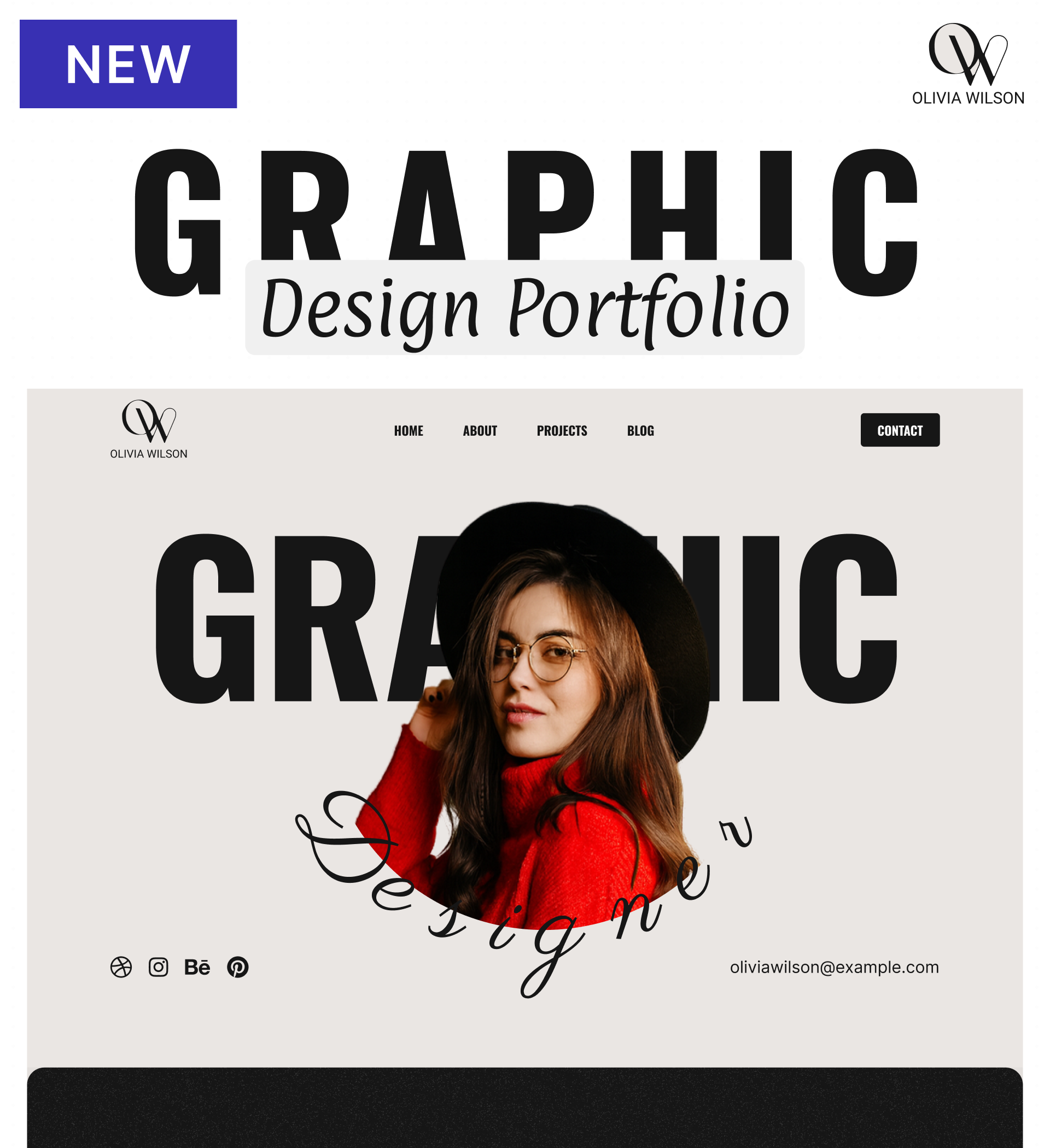
Olivia Wilson - Graphic Design Portfolio Website Template

A striking template for graphic designers to showcase portfolios, services, and experience through bold typography, modern layouts, and comprehensive project presentations.

Landing your next design client starts with a portfolio that commands attention. The Bold template brings together oversized typography, clean layouts, and strategic content sections to help graphic designers present their work with confidence and clarity.

Whether you're a freelance designer building your client base or an established creative showcasing your evolution, this template handles everything from detailed project galleries to service breakdowns and client testimonials. The modern, monochromatic aesthetic with strategic color accents lets your work take center stage while maintaining a polished, professional presence.

Built on Dorik's no-code platform, you can customize every element to match your creative vision without touching code. Launch your portfolio in an afternoon, not weeks.

Key Features

Display Your Best Work Through Organized Galleries

The Portfolio section uses a grid layout to present your design projects with visual impact. Each project preview invites exploration while maintaining clean organization across your body of work.

Visitors can browse your range quickly, then dive into individual projects to see your process and results. This structure helps potential clients find relevant examples without overwhelming them with too much at once.

Build Credibility with Client Testimonials

The Testimonial Slider showcases feedback from satisfied clients, rotating through reviews to build trust with visitors. Real experiences from past clients help prospects feel confident choosing you.

Position these testimonials strategically throughout your site to reinforce your expertise at key decision points. Social proof matters—especially when creative work is subjective.

Quantify Your Experience with Animated Statistics

Counter Animation brings your career metrics to life—years of experience, projects completed, happy clients, or industry recognition. These numbers scroll into view as visitors explore your page, creating visual interest while communicating credibility.

Statistics provide objective proof of your track record, complementing your visual portfolio with measurable achievements that resonate with business-minded clients.

Answer Common Questions Before They're Asked

The Accordion FAQ section addresses typical client concerns about your process, pricing structure, timeline expectations, and collaboration approach. Organized in collapsible sections, it provides detailed answers without cluttering your page.

Proactively addressing questions builds confidence and qualifies leads—visitors who understand your approach are more likely to be ideal clients when they reach out.

Reusable Components

Create reusable components for elements you'll use across multiple pages—your navigation header, footer, or contact call-to-action sections. Design them once in Dorik's visual editor, then deploy them wherever needed.

When you update a reusable component, changes propagate across every instance automatically. This ensures consistency in your About section headers, your Services page layout, or your Blog post footers without manual updates to each page.

Customizations

Dorik's drag-and-drop editor puts complete control in your hands. Adjust colors to match your brand palette, select typography that reflects your design philosophy, and rearrange layouts to prioritize what matters most for your audience.

The responsive framework automatically adapts your design across devices, so your Portfolio displays beautifully on desktop, tablet, and mobile without additional work. For designers wanting granular control, custom CSS options are available—but most customization happens visually through the interface.

Special Features

The template includes Counter Animation that brings your professional statistics to life as visitors scroll—displaying years of experience, completed projects, client satisfaction metrics, or industry awards with engaging visual effects.

Dorik's platform delivers unlimited storage and bandwidth, so your high-resolution project images and case study details never hit resource limits as your portfolio grows. The global CDN ensures fast loading times worldwide, keeping your site responsive for international clients.

Use Cases

Freelance Graphic Designers Building Their First Portfolio

You've completed several successful projects and need a professional home to showcase your growing capabilities. Your work speaks for itself, but you need the right presentation to convert browsers into clients.

This template provides the structure to display your projects effectively, share your approach through Services descriptions, and build confidence through Statistics and Testimonials—all essential elements for establishing credibility as you build your freelance practice.

Brand Identity Designers Seeking Corporate Clients

Your expertise lies in crafting cohesive visual identities, and you need a portfolio that demonstrates strategic thinking alongside aesthetic skill. Corporate clients want to see both the final deliverables and your problem-solving process.

The Projects section lets you present comprehensive case studies showing research, iteration, and final applications. Combined with the Services page explaining your methodology, you can position yourself as a strategic partner rather than just a visual executor.

Design Studio Teams Marketing Their Collective Work

Your studio has multiple designers working on varied projects, and you need to present your collective portfolio while highlighting individual expertise. Team credentials matter as much as project quality when competing for larger engagements.

Use the Team Members section to introduce your designers, the Portfolio to showcase collaborative projects, and Client Logos to demonstrate the caliber of organizations trusting you with their visual identity. The Blog Preview lets you share design insights that position your studio as thought leaders.

Established Designers Refreshing Their Online Presence

You've built a strong career over the years, but your current portfolio doesn't reflect your evolved skills or recent direction. You need a modern update that honors your experience while showing where you're heading.

The Statistics section quantifies your years of experience and project volume, while the Portfolio focuses on your strongest recent work. The About page tells your story with nuance, and the Blog gives you space to share perspectives that demonstrate your industry knowledge and current thinking.

Why Choose Olivia Wilson - Graphic Design Portfolio Website Template?

  • Fixed header navigation keeps your menu accessible as visitors explore projects, unlike scrolling designs that hide navigation and frustrate users trying to contact you
  • Built-in blogging platform included without external integrations, letting you share design insights and improve SEO through original content that attracts your ideal clients
  • Counter Animation displays your experience metrics engagingly, rather than static text that clients scroll past without registering your years of expertise
  • Accordion FAQ organizes common questions cleanly, unlike lengthy text blocks that overwhelm visitors before they understand your services and approach
  • Grid layout Portfolio section scales infinitely as your work grows, avoiding single-page designs that become cluttered when showcasing comprehensive project ranges
  • No platform fees on unlimited bandwidth and storage, unlike portfolio platforms charging monthly based on traffic volume or file hosting limits
  • Testimonial Slider rotates client feedback automatically, showing social proof without requiring visitors to scroll through lengthy review sections manually

Foire aux questions

Can I showcase detailed case studies for my design projects?

Yes. The Projects page supports comprehensive project presentations including challenge descriptions, your creative process, solution details, and final deliverables. Add multiple images, explain your thinking, and walk clients through your methodology for each featured project.

Do I need coding skills to customize the template?

No. Dorik's visual editor handles all customization through drag-and-drop controls. Adjust colors, fonts, layouts, and spacing using intuitive tools. Custom CSS is available for advanced users but not required for professional results.

How do I add new projects to my portfolio over time?

The CMS makes adding projects simple. Create new entries through the content management system, upload images, write descriptions, and publish. Projects automatically populate in your gallery using the template's existing layout structure.

Can clients contact me directly through the site?

Yes. The Contact page includes form integration where visitors can submit inquiries. You'll receive submissions directly, and Contact Information displays your email and social media links for direct outreach options.

Is the template mobile-responsive for phone viewing?

Absolutely. The responsive design automatically adapts to all screen sizes. Your portfolio grid, testimonials, statistics, and all other sections display properly on phones, tablets, and desktops without manual adjustments.

Can I write blog posts to share design insights?

Yes. The built-in blogging platform includes a content editor for creating articles. Write about design trends, share process insights, or discuss industry topics. Posts appear in the Blog section with SEO controls for better discoverability.

How do I display client testimonials effectively?

The Testimonial Slider rotates through client feedback automatically, showing multiple reviews without requiring visitors to scroll endlessly. Add client names, companies, and their feedback to build credibility throughout your site.

Are there limits on how many projects I can showcase?

No project limits exist. Add as many portfolio pieces as effectively represent your capabilities. Unlimited storage supports high-quality images for all your work, and the grid layout scales to accommodate your growing portfolio.

Can I show my design process and not just final work?

Yes. Project pages support multiple images and detailed descriptions, letting you share sketches, iterations, client feedback, and evolution from concept to completion. Show the thinking behind your designs, not just polished results.

How quickly can I launch my portfolio site?

Most designers customize and publish within hours. Add your content, adjust colors and fonts to match your brand, upload project images, and go live. No lengthy development cycles or technical dependencies slow you down.

Categories
Styels
  • Modern
  • Bold
  • Clean
Layout
  • Multi-page
  • Grid Layout
  • Card Layout
  • Hero Centered
Caractéristiques
  • Responsive Design
  • Content Management System (CMS)
  • Fully Customizable
  • SEO Optimized
  • Mobile First
  • Performance Optimized
  • CSS Grid
  • Flexbox
  • Image Background
  • Fixed Header
  • Navigation Menu
  • Regular Button
  • Social Icons
  • Accordion
  • Counter Animation
  • Testimonial Slider
Sections
  • Hero
  • Call-to-Action Buttons
  • Services
  • About
  • Le portefeuille
  • Testimonials
  • FAQ
  • Statistics
  • Team Members
  • Blog Preview
  • Contact Information
  • Social Media Links
  • Footer
  • Icon + Text
  • Image Gallery
Pages
  • Home
  • About
  • Services
  • Projects
  • Blog
  • Contact

Créez un site Web avec AI !